
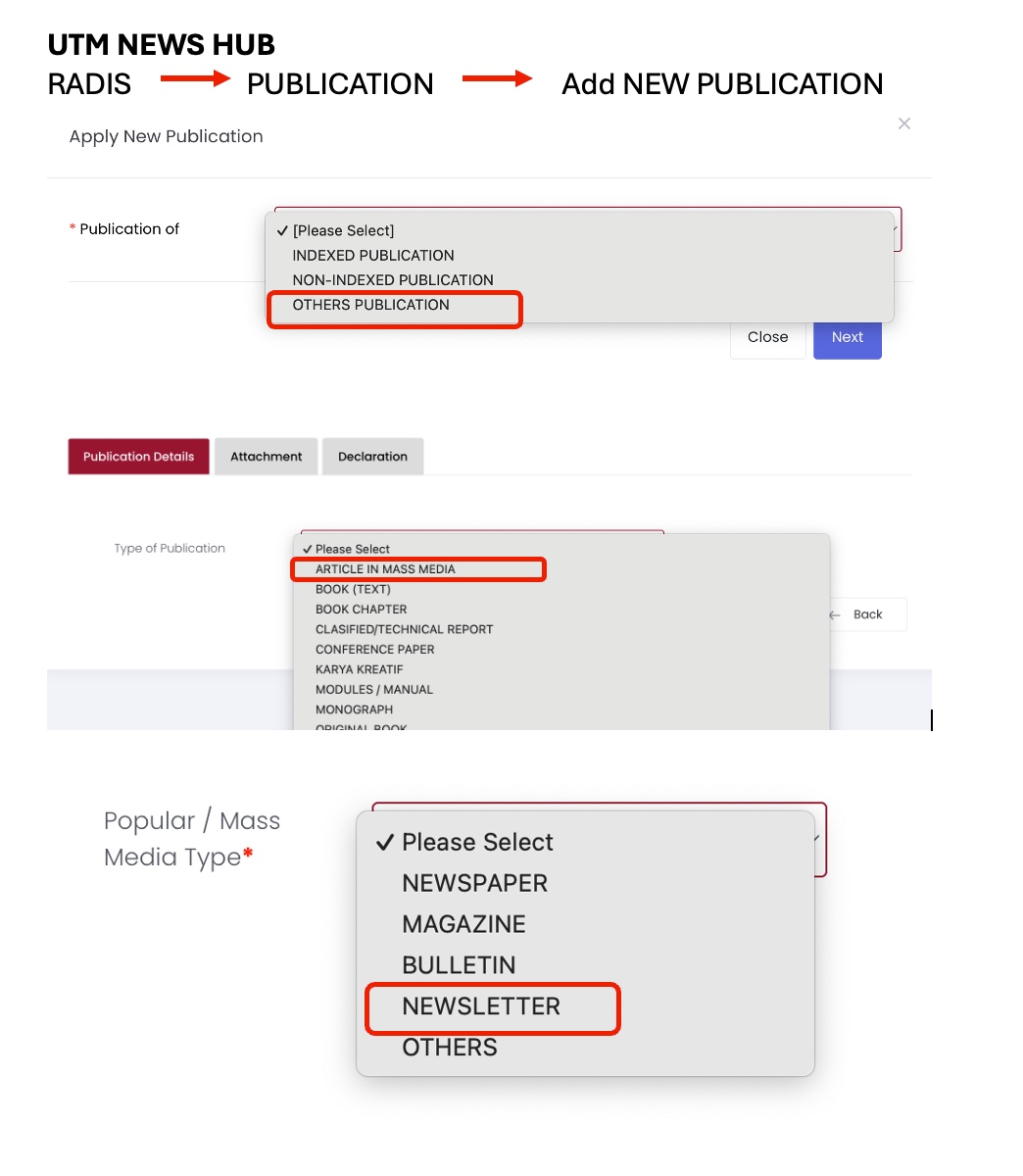
Dimaklumkan kepada semua warga Fakulti Kejuruteraan Awam (FKA) bahawa penerbitan berbentuk Newsletter boleh direkodkan di dalam sistem UTM News Hub (RADIS) dengan menggunakan tetapan berikut:
Langkah-Langkah Perekodan:
-
Log masuk ke sistem UTM News Hub (RADIS).
-
Pilih menu Publication.
-
Klik Add New Publication.
-
Pada medan Publication of, pilih:
-
OTHERS PUBLICATION
-
-
Pada medan Type of Publication, pilih:
-
ARTICLE IN MASS MEDIA
-
-
Pada medan Popular / Mass Media Type, pilih:
-
NEWSLETTER
-
-
Lengkapkan maklumat penerbitan yang berkaitan dan muat naik dokumen sokongan (jika berkenaan).
-
Sahkan maklumat dan hantar rekod penerbitan.
Perhatian:
-
Pemilihan kategori yang tepat adalah penting bagi memastikan penerbitan direkodkan dengan betul dan selaras dengan garis panduan UTM.
-
Sila pastikan semua maklumat yang dimasukkan adalah lengkap dan tepat.
All members of the Faculty of Civil Engineering (FKA) are hereby informed that Newsletter publications can be recorded in the UTM News Hub (RADIS) system using the following settings:
Recording Steps:
-
Log in to the UTM News Hub (RADIS) system.
-
Select Publication from the menu.
-
Click Add New Publication.
-
Under Publication of, select:
-
OTHERS PUBLICATION
-
-
Under Type of Publication, select:
-
ARTICLE IN MASS MEDIA
-
-
Under Popular / Mass Media Type, select:
-
NEWSLETTER
-
-
Complete the relevant publication details and upload supporting documents (if applicable).
-
Review the information and submit the publication record.
Note:
-
Selecting the correct category is important to ensure that publications are recorded accurately and in accordance with UTM guidelines.
-
Please ensure that all information provided is complete and accurate.